AI agent development for work that needs a person’s sign-off
I build AI agents that take over the repetitive part of a job: reading a client request, drafting the project plan, updating the CRM. Then they stop. Nothing reaches your tools until a person on your team approves it.
It is AI workflow automation with a human in the loop, built as LangGraph agents on a Python backend.
- Starts at
- €7,500 for one workflow
- Typical length
- 6 to 10 weeks
- Who approves
- A person on your team, before anything is written to your tools
- You keep
- The code in your repository, tests, evals and a handover session
audience
Who this is for
Owners and ops leads at agencies, service businesses and small software companies, where the same information is handled by hand more than once before real work starts. Typical situations:
- An account manager reads a client’s email, retypes it into Asana as tasks, then again into HubSpot as a deal. It takes an hour, and the two copies drift apart.
- A project slips. The blocker was mentioned in a task comment on Tuesday and nobody read it until the Friday status call.
- Every new engagement starts with someone building the same kind of plan from a blank page, and the missing information turns up halfway through.
- Someone chases a client for missing details by email, and has to remember to chase again.
deliverables
What you get
One agent workflow, connected to your tools
The agent reads the input (an email, a form, a chat message), drafts the result and puts it in front of a person. I connect it to the tools the workflow touches. I have built against Asana and HubSpot; for any other tool I read its API before I quote.
An approval step that records who approved what
A person edits the draft freely, then approves or declines it. The approval names the person and the exact version they approved. If the draft is edited after approval, it goes back for another look.
Rules in plain code, not in the model
Dates, totals, deadlines and forecasts are calculated by ordinary code you can read and test. The model reads messy text and drafts; its output is checked against a fixed format before anything uses it.
Each action happens once
Networks fail and webhooks arrive twice. Every write to your tools carries a key that makes a repeat harmless, and when the outcome of a call is unknown I look it up before trying again. You do not get two deals or two projects.
Limits that live in code
Every model call is counted against a spend cap before it is made, and the agent stops and says so when the cap is reached. Emails, task comments and CRM fields are treated as data, not instructions: they reach the model quoted inside the message, never in the system prompt, so text in an email cannot talk the agent into anything.
Tests, evals, documentation and a handover
Automated tests for the code, and scenario evals that run the agent against realistic cases and score what it drafts, under a hard token cap. Documentation covers how to run it, configure it and change it, and a handover session walks your team through all of it.
schedule
How it runs
Before anything is agreed
Brief
You send a short brief. I reply within two working days with whether an agent is the right tool, a rough scope and a price range. If a simpler tool would do the job, I say so then.
Your part Write a few lines about the work and who does it now.
Week 1
Scope and fixed price
We go through one real example from start to finish. I write down the workflow, the tools involved, what the agent may do alone, what needs approval and what counts as done. You get a fixed price for that scope.
Your part An hour with the person who does this work today, and ten real examples.
Weeks 2 to 4
Drafts only
I build the agent against your examples with writing to your tools switched off. It drafts; you read the drafts and tell me what is wrong. Each correction becomes a test case, so the same mistake does not come back.
Your part Review the drafts. This is the step that decides how good the result is.
Weeks 4 to 8
Live, with approvals on
I connect the agent to a test workspace first, then to your live tools, with the approval step on. Your team uses it on real work while I fix what turns up.
Your part A test workspace in each tool, and a few people who use it every day.
Final week
Handover
The code is in your repository and the documentation is written. In a handover session I walk your team through running, changing and monitoring it.
Your part Bring the people who will own it.
limits
What I will not do, and when AI is the wrong tool
- I will not build an agent that acts for you without approval. Sending client messages, committing you to a date or changing a price stays behind a person’s approval.
- I will not build one when the rules fit on a page. If the process is the same every time, a form, a spreadsheet formula or a no-code automation is cheaper and more predictable than an agent. I will tell you so.
- I cannot test an agent when nobody can say what a good result looks like. If we cannot find ten real examples with known good outcomes, we write them first or we do not start.
- I will not promise it is always right. It will make mistakes. I design for them to be visible and cheap to catch: drafts, approvals and logs.
- I do not take on a company-wide AI strategy. I build one workflow at a time, and the agents I build prepare work for your people rather than replace them.
evidence
Proof from my own agent project
The notes above come from the AI service delivery coordinator, a system I built myself to show how I work. It turns a client request into a plan, sets the project up in Asana and HubSpot after a person approves it, then watches delivery and proposes what to do about blockers and slipping dates. It is a portfolio project, not a client engagement.
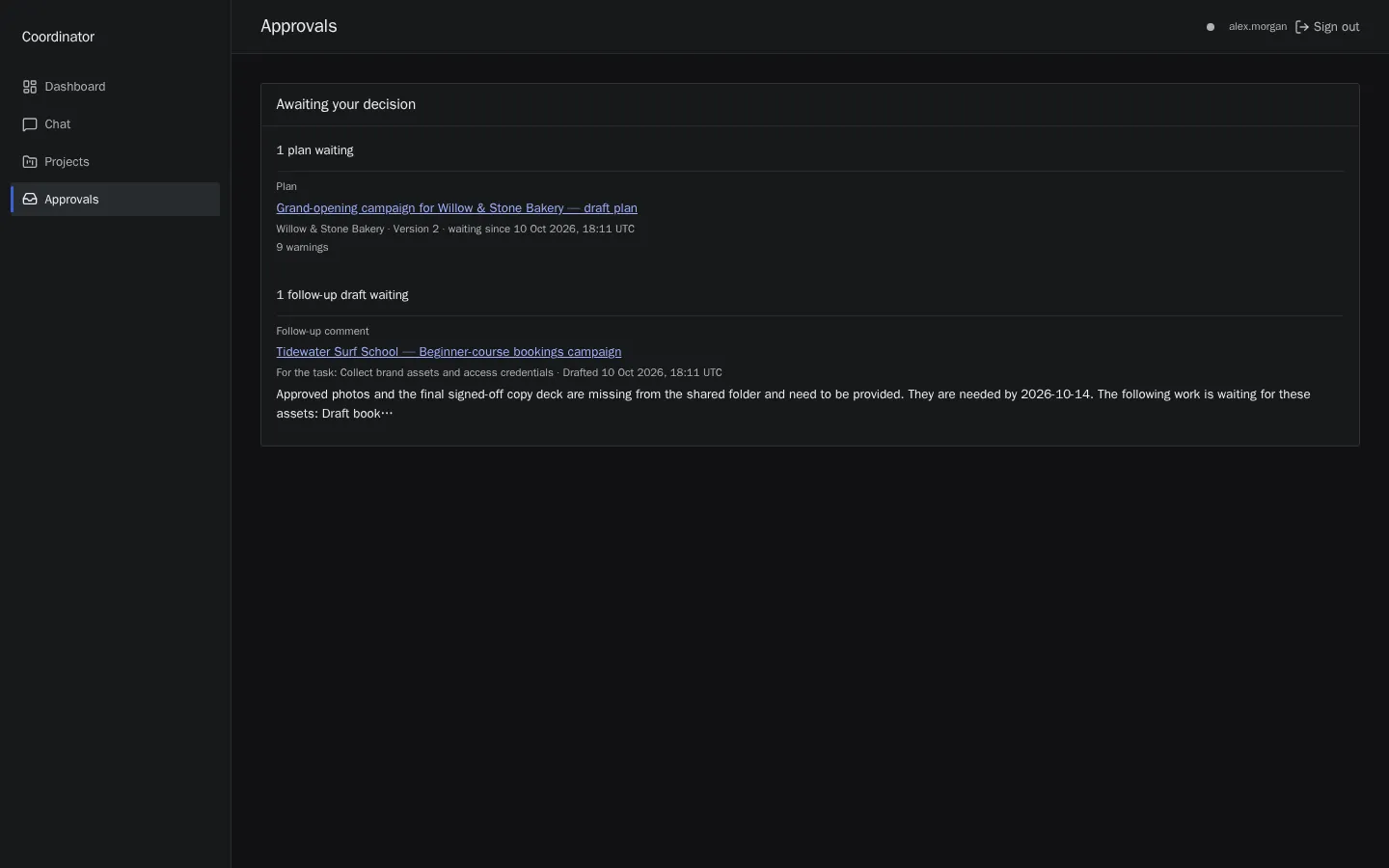
The demo runs with stand-in versions of Asana and HubSpot and recorded agent answers, so nothing a visitor does reaches a real system. Read the case study or watch the three-minute walkthrough.
price
What it costs
from
€7,500
for one workflow, at a fixed price for a scope we write down first.
what pushes the price up
- How many tools the agent reads from and writes to.
- How many different cases the workflow has to handle: each exception is its own path to build and test.
- Whether I build an approval screen, or you approve inside a tool you already use.
- Reacting to changes in your tools as well as writing to them.
- Who may approve what, when there are several roles.
Model usage is billed to your own provider account, with the spend cap set in code. I estimate it before we start.
Questions people ask
How much does an AI agent cost to build?
One workflow starts at €7,500, at a fixed price for a scope we write down first. The price moves with the number of tools the agent reads from and writes to, the number of different cases it has to handle, whether I build an approval screen or you approve inside a tool you already use, and whether it must react to changes in your tools as well as write to them. After your brief I give a range; after the scoping conversation, a fixed price.
What does it cost to run?
The main running cost is model usage, billed by the model provider to your own account, not through me. It depends on how much work flows through the agent and on the model. I estimate it from your expected volume before we start and set the spend cap in code to the budget we agree. Hosting is a separate bill from whoever hosts it.
Will the agent act without anyone checking?
Not for anything that matters. Reading is automatic. Writing to your systems, messaging a client, or anything that changes money or commitments waits for a person’s approval. We can decide together that a few low-risk steps, such as adding a label, run unattended, and you can switch that on later once you trust the drafts.
Where does our data go?
The text the agent has to read is sent to the model provider’s API each time it runs, together with the calls to your tools that you authorise. Your records stay in your tools; any database the agent keeps lives wherever the code is hosted, normally your own account. Large providers state in their standard API terms that customer inputs are not used to train their models by default. Check the current terms of whichever provider we choose; I link the exact page in the proposal.
If some data must not go to a hosted model at all, tell me in the brief. We then decide whether to remove it before it reaches the model, change the provider setup, or not use a model for that step.
Which AI models do you use?
Both of my portfolio projects use OpenAI models. I choose per project on quality, cost and where your data may go, and I keep model names in configuration rather than scattered through the code. After any change of model I re-run the evals, so you can see whether the switch helped or hurt.
Who owns the code?
You do. It lives in a repository you own, and open-source libraries I use keep their own licences. I may reuse general techniques on other work, never your data.
What happens after handover?
Your team can run and change the agent from the documentation and the handover session. I fix defects in what I built for 30 days after handover at no charge. After that you can look after it yourselves, hire me for a one-off change, or take a retainer, from €1,800 a month, for monitoring and improvements.
How long does it take?
Typically 6 to 10 weeks for one workflow. Having ten real examples and a test workspace ready puts you at the short end. Slow access to your tools, and slow feedback on the drafts, stretch it.
Describe the work your team keeps retyping.
Send a short brief: what the work is, who does it now, and what it costs you. I reply within two working days with a rough scope, a price range and whether AI is the right tool for it at all.
Send a briefOr write to keel.agents@gmail.com.